Concepts
ainb is a terminal workspace manager and supervisor for AI coding agents. It gives every agent its own git worktree, its own persistent tmux session, and connects them to a unified attention inbox.
Workspace
A workspace is a git repository checkout. In ainb, workspaces group running sessions. You can switch between workspaces with h and l in the TUI, or pass --repo <path> on the command line.
Each workspace tracks active sessions, orphan branches, and spend attribution.
Session
A session is an isolated agent run. When you spawn a session:
ainbcreates a new git worktree directory.ainbcreates a dedicated tmux session named for the session.ainblaunches the selected agent (Claude Code, Codex, Copilot, shell) inside that tmux session.
Because the session is an independent process tree, killing the TUI or closing your terminal does not stop the agent. You can reattach anytime:
ainb attach <session-name>Worktree isolation
Running multiple agents in the same git working directory causes index lock races, dirty working trees, and accidental overwrites.
ainb enforces worktree-per-session isolation:
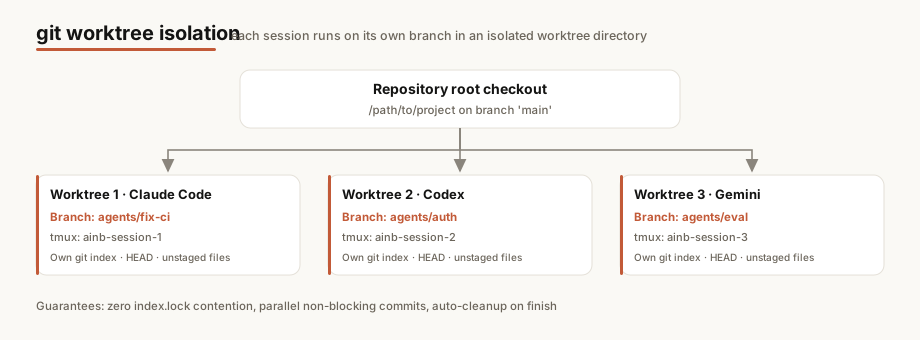
Each worktree has its own index, HEAD, and unstaged files. When a session finishes, ainb cleans up the worktree directory without losing committed work on the branch.
tmux persistence
Every agent runs inside a real tmux session. This provides three guarantees:
- Survival across disconnects: Terminal closes, SSH drops, and laptop sleep do not terminate the session.
- In-pane or full-screen attach: Press
ain the TUI to attach full-screen, orAto embed the live tmux pane directly inside the TUI preview area (Ctrl+Qreleases control). - Headless automation: Scripts and background daemons can inspect screen contents, send keystrokes, and monitor agent exits without keeping a GUI open.
Multi-provider engine
ainb treats coding agents as interchangeable runners behind a uniform session lifecycle:
| Provider | CLI Tool | Model Support |
|---|---|---|
| Claude | Claude Code | Sonnet, Opus, Haiku |
| Codex | Codex CLI | GPT-4o, o1, o3-mini |
| Copilot | GitHub Copilot CLI | Claude, GPT variants |
| Shell | zsh / bash | Manual terminal session |
| SSH | ssh | Remote box execution |
The new-session wizard (n) lets you select the provider, pick a model, toggle YOLO auto-approve mode, and configure initial prompts.
Attention and Inbox
Supervising five agents by cycling terminal tabs is slow and error-prone. ainb uses an attention-driven model:
- Blocked on user (ASK): The agent asked a question or offered choices. You can answer directly from the Fleet panel (
f) without attaching. - Permission required (APPROVE): The agent requested execution of a sensitive command. Press
yornin the Fleet panel to decide. - Completed or errored: The event lands in the central Inbox (
borI).
You only interact with an agent when it needs your input.
Shared daemons and MCP pool
Starting heavyweight Model Context Protocol (MCP) servers and proxy tools for every session wastes memory and CPU.
ainb runs background daemons:
- notifyd: Routes ASK and APPROVE events between agent hooks, terminal overlays, and external bridges (Telegram, Slack, Discord).
- Shared MCP pool: Runs MCP servers once on the host. All active sessions connect over domain sockets instead of launching duplicate server processes.
- Headroom proxy: Token optimization proxy that transparently compresses context history (RTK) for long-running sessions.
Plugins (v2 ABI)
The ainb host is extensible via native binary plugins:
- Subprocess execution communicating over JSON-RPC on stdio.
- Default-deny capability security (network, file access, and secrets require manifest permissions).
- Plugins can register custom TUI screens, CLI subcommands, and statusline segments.
- Shipped in-tree:
burndown(cost tracker),session-reader(event stream),witr(process causality tree),learnings(knowledge graph), andabtop(fleet process monitor).