Overview
A terminal-native ecosystem for managing AI coding agents. Three components share one monorepo, plus a supporting knowledge library:
| # | Component | What it is |
|---|---|---|
| 1 | ainb TUI + CLI | Rust terminal app for spawning and supervising AI coding sessions. Each session gets its own git worktree and tmux session. Multi-provider: Claude Code, Codex, Gemini, Copilot, Kiro, raw shell, SSH. |
| 2 | ainb-toolkit | Portable skills + agents + workflows that deploy to 9 different AI coding tools from a single source. 94 skills, 16 agents. Lives in the standalone stevengonsalvez/ainb-toolkit repo; ainb consumes it as a pinned external source. |
| 3 | Plugins (v2 ABI) | Native-binary plugins for the TUI host. Capability-gated, JSON-RPC over stdio. Own screens, CLIs, statusline segments. Two reference plugins ship in-tree (burndown, session-reader). |
| 4 | reflect-kb | Knowledge capture and retrieval library. Two-tier: QMD for fast vector search + nano-graphrag for cross-project entity-relation queries. Installed as the reflect CLI. |
The whole thing is open source (MIT) and runs locally. No accounts, no cloud, no telemetry.
Who it’s for
Solo developers and small teams who:
- Already live in
tmuxand a terminal multiplexer - Run multiple AI coding sessions in parallel and want them isolated
- Prefer keyboard-driven tools to web dashboards
- Want a single learning system that captures insights across every coding session
If you have ever had two Claude Code sessions stomp on each other’s branches, lost context across compaction, or wanted to wire up swarm-style agent coordination from the terminal, this is built for that.
What it’s not
- Not a hosted SaaS. No accounts, no servers, no signup.
- Not a Claude Code replacement. It orchestrates Claude Code (and other tools); it does not reimplement them.
- Not Windows-native. Use WSL2.
- Not an IDE plugin. It is a terminal application.
Ecosystem map
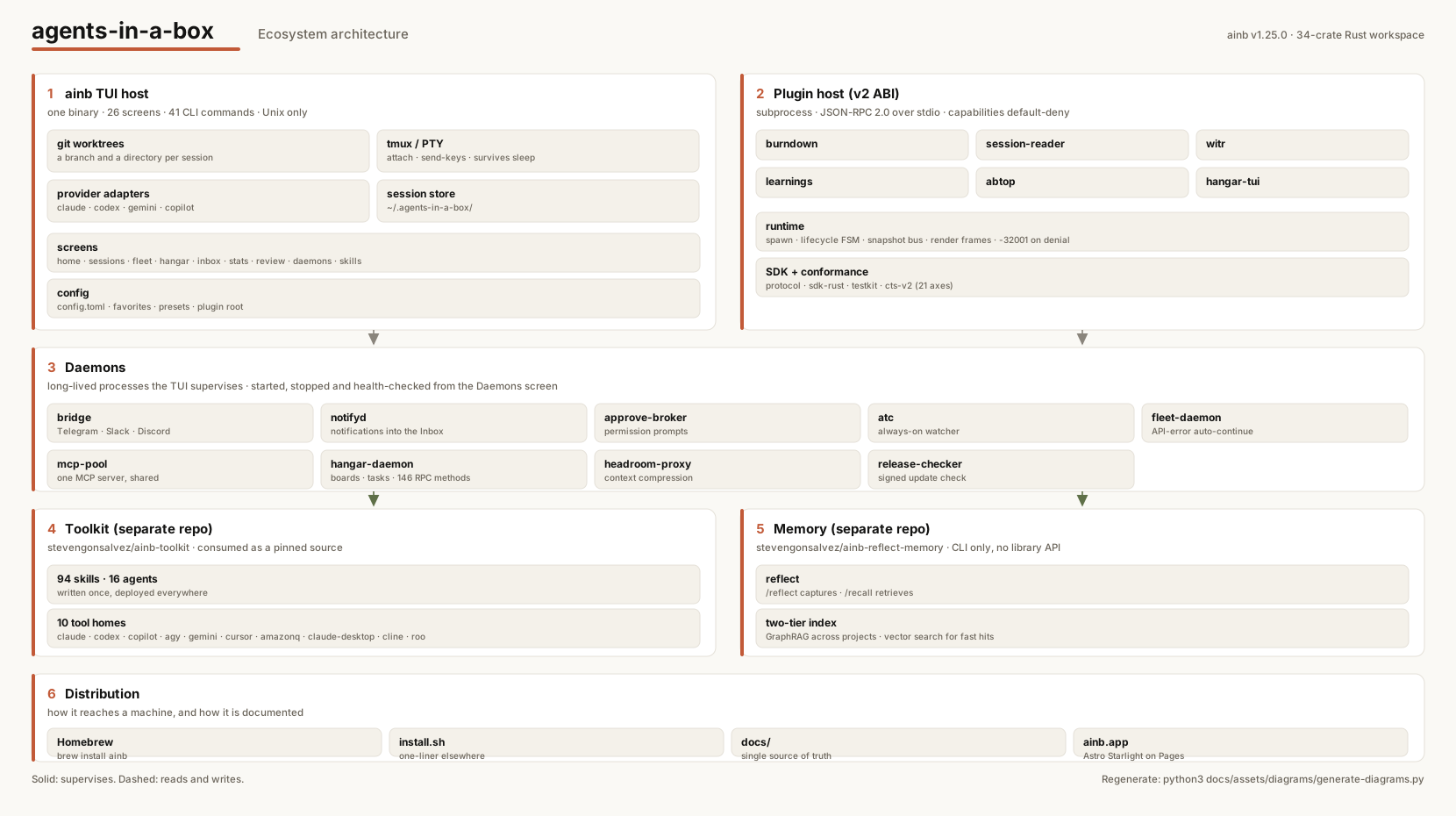
Solid arrows are supervision. Dashed arrows are read and write data flows.
Each component is independently useful. You can use ainb-toolkit without ever opening the TUI; you can use the TUI without ever writing a plugin; you can use reflect-kb standalone.
Where to go next
- Install ainb
- Quickstart: first session in 60 seconds
- Concepts: workspaces, worktrees, and sessions
- Keyboard shortcuts
- CLI reference